Modals
Use a modal to show content in an overlay that temporarily blocks interaction with the underlying page, focusing the user’s attention on a single task or message.
Using a work in progress component
This version is a work in progress and has not been finalized for the Ontario Design System. It currently includes early-stage Figma designs but no corresponding code.
Teams may use this component as a starting point but may need to conduct additional research and adapt the designs for their specific needs.
Design example
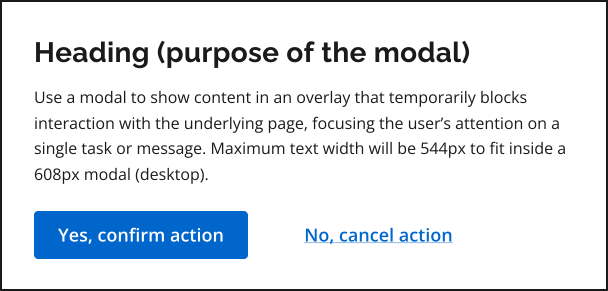
To request access to the work in progress component file, email design.system@ontario.ca.
When to use this component
Use a modal (also known as a dialog or pop-up) to prompt users to make a decision, confirm an action, or complete a focused task. Modals should be used sparingly because they can increase cognitive load and disrupt user flow.
You can use a modal when:
- the user must make an explicit decision or confirm an action before continuing (for example, flagging critical information or confirming a destructive or irreversible action)
- the user needs to complete a short and self-contained task
When not to use this component
Do not use a modal when:
- the content is long or complex
- the task requires frequent reference to information on the underlying page
- the interaction could work as part of the page layout instead (for example, as an error, success, or warning messages)
- multiple modals would need to be stacked or chained
Share your findings
If your team uses or tests this early version, we encourage you to share your findings with us. Your feedback supports the future development of the component.
Email us at design.system@ontario.ca
If you have any questions or feedback, please get in touch.