Sorting and filtering results
Help users quickly sort and filter search results with controls and tags, making it easier to efficiently find relevant content.
Using a work in progress pattern
This is a pattern, not a standalone component. It uses multiple components in a structured way to solve a common user need.
This pattern is a work in progress and has not been finalized for the Ontario Design System. It currently includes early-stage Figma designs and preliminary guidance, but no corresponding code.
Teams may use this pattern as a starting point but may need to conduct additional research and adapt the designs for their specific needs.
Design example
Example
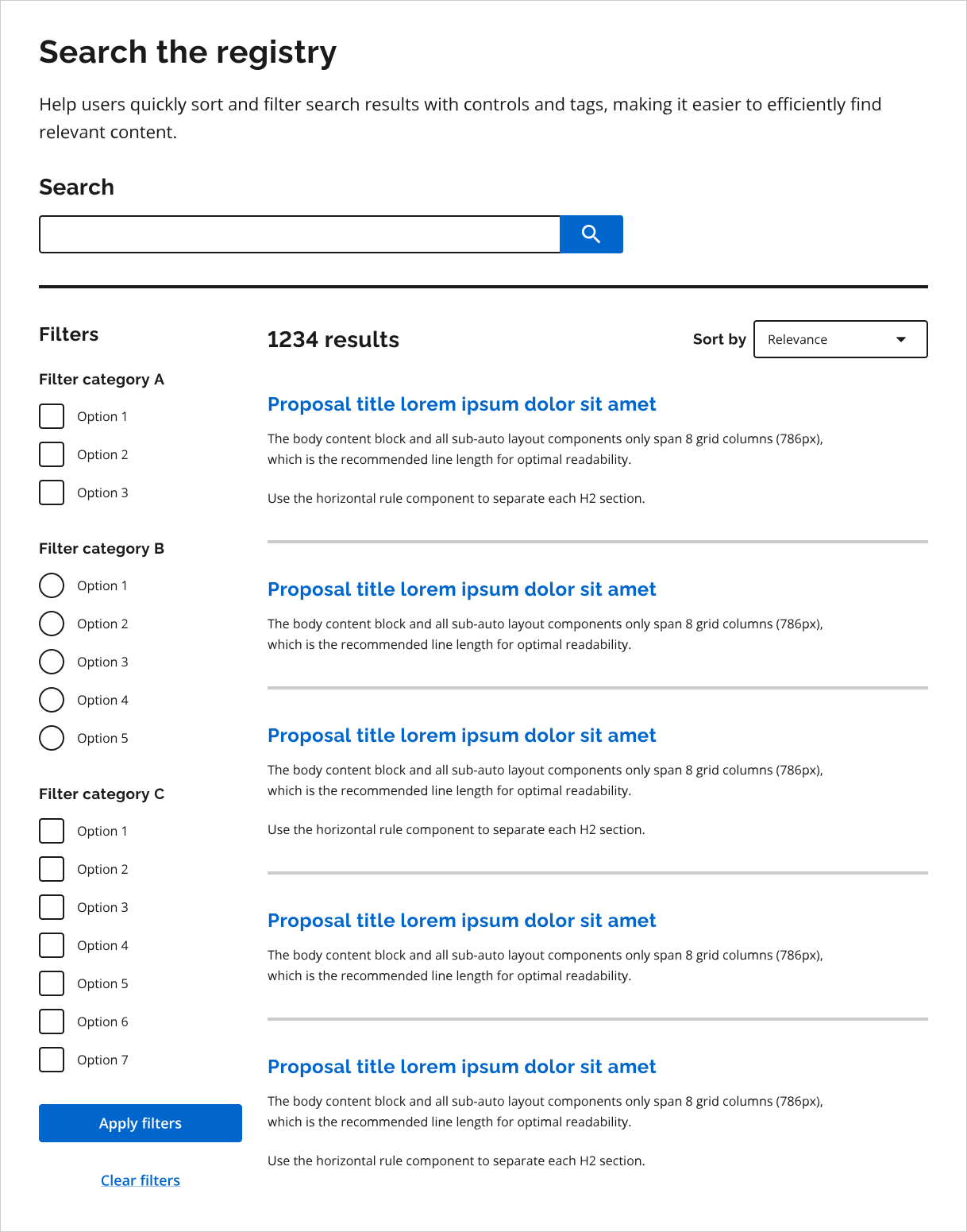
To request access to the work in progress design files, email design.system@ontario.ca.
When to use this pattern
Use this pattern on search or results pages when:
- users need to refine a large set of results
- results can be meaningfully narrowed using multiple criteria
When not to use this pattern
Do not use this pattern when:
- the list of results is already small and easy to scan
- users are completing a single, linear task rather than exploring results
- refinement options are minimal and can be handled through simple page layout or content grouping
- filtering or sorting would add unnecessary complexity or cognitive load
How the pattern works
This pattern is made up of multiple components (sort by, filters and applied filter tags) used on search or results pages. These components can be used individually or in combination, depending on user needs and content complexity.
Not every page will require each component. For example, you may include filters without applied filter tags, or sorting without filters.
Sort by
Sorting allows users to change the order of results. If you include sort by in the pattern, ensure that:
- only one sort option can be applied at a time
- changing the sort order does not remove or reset applied filters
Filters
Filters allow users to narrow results based on specific criteria. Filters can be implemented in various formats, including:
- a “Filter by” dropdown list
- checkboxes or radio buttons grouped by category
If you include filters in the pattern:
- consider making filters collapsible when there are multiple filter groups or on smaller screens
Applied filter tags
Applied filter tags show users which filters are currently active. If you include applied filter tags in the pattern:
- ensure tags represent applied filters only (not the sort order or the search term)
- ensure tag labels are concise, descriptive and match the corresponding filter labels
- consider making tags removable so users can clear individual filters
Consistent user interaction
Changes to sort by, filters and applied filter tags should apply either immediately or after the user selects an explicit “Apply” action. The chosen approach should be consistent across the different components based on accessibility considerations and user testing.
If changes are applied immediately, clear visual feedback must be provided to communicate that the update has taken effect.
Best practices
When designing or implementing this pattern:
- ensure sorting, filtering and tags are keyboard accessible
- keep filter categories concise and meaningful to reduce cognitive load
- ensure filters, tags and results behave consistently across similar pages
This guidance is not comprehensive. You may need to conduct additional research and testing to ensure the pattern meets user needs and aligns with accessibility and usability best practices.
Share your findings
If your team uses or tests this early version of the pattern, we encourage you to share your findings with us. Your feedback supports the future development of the design system
Email us at design.system@ontario.ca
If you have any questions or feedback, please get in touch.